GitHub: Set up a new repository
This section shows the necessary steps to deploy a model in AIR.
Note
Make sure that AIR has been enabled. Read more.
Step 1: Create a new repository to use the AIR template
Create a new repository in the
cognitedataorganization in GitHub and under the Repository template option select the AIR template.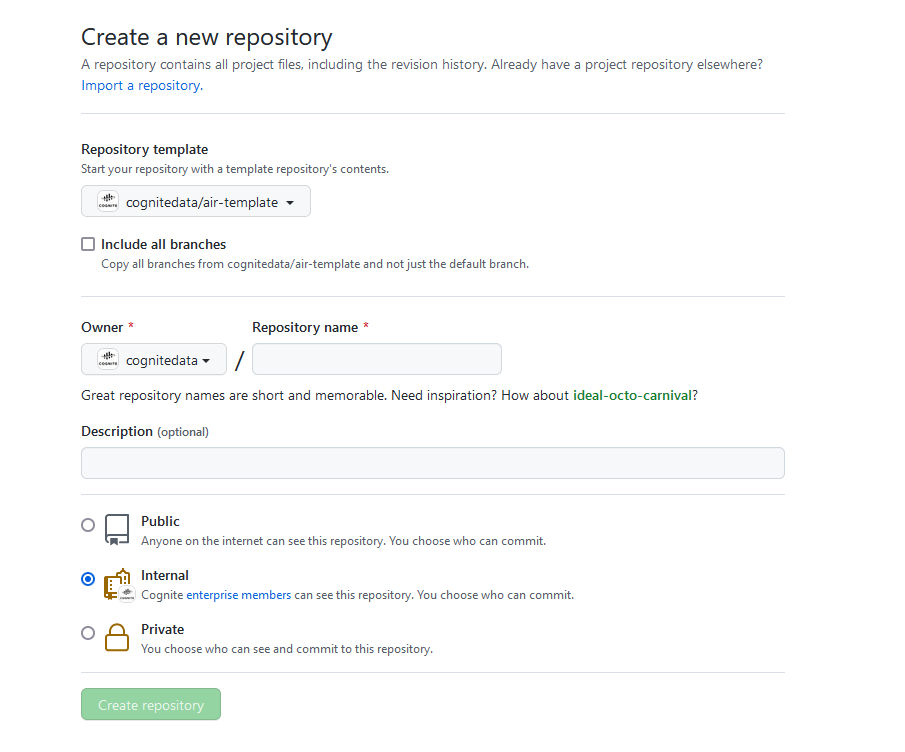
When the repository has been created, use the
git clonecommand to clone the new repo locally.Then use the
cdcommand and swich into the project folder.
Step 2: Create a new development branc
- When the repository is created, use the command
git checkout -b your_branch_nameto create a new development branch.
Step 3: Deploy your model to your project
- Navigate to the repoconfig.yaml file in the root folder to set the correct values.
- Navigate to the project properties, and add a mapping with these values:
PROJECT_NAME: ["PROJECT_URL", "PROJECT_NAME_API_KEY"]. - Under the
ProjectFunctionMapwrite the name of the function that needs to be deployed and the project you wish to deploy the function to.
Note
The PROJECT_NAME_API_KEY must be the same name as used in the secrets for your web-based Git repositories.
Projectproperties:
  my-project: ['https://api.cognitedata.com', 'MY_PROJECT_API_KEY']
ProjectFunctionMap:
  my_function:
    - my-project
You are now ready to create your first function! Read more about functions.